Ask a question. Helix runs the analysis.
Helix is the AI assistant built into Foundry120. It reads your samples, datasets, and documents, analyses them on demand, and shows you its working.
Integrated with your data.
Because Helix runs inside the platform, it inherits your access exactly. It reads a study the way your account does, so it cannot surface data you are not approved to see, and every read lands on the same access log as a manual download.
What Helix does with a question.
Helix has a set of governed tools and picks the right one for the question, from a quick lookup to a full analysis run. These are the ones it reaches for most.
Find and filter
Filter samples across a study by type, timepoint, participant, or usage, and get counts back.
Read documents
Search the document library by keyword or pattern, and read the passages that answer the question.
Query and join
Query datasets and join them, harmonising keys where needed.
Summarise
Reduce a dataset to counts and summary statistics, grouped the way you asked.
Chart
Return a plot alongside the table when a trend is easier to see than to read.
From a quick answer to a full analysis run.
Some questions need real computation. Helix accesses two compute backends designed for real data analysis and bioinformatics workflows.
In-conversation Python
Lighter analysis runs in a secure Python data science sandbox, including statistics, survival analysis, and plots. Helix writes and runs the code over your approved data and returns result files as graphs and tables that you can download.
Governed batch jobs
Heavier analysis spins up an Azure Batch job on dedicated compute, using pre-designed analysis profiles. Heavy jobs request approval before they start and are tracked to completion.
Every answer shows its working.
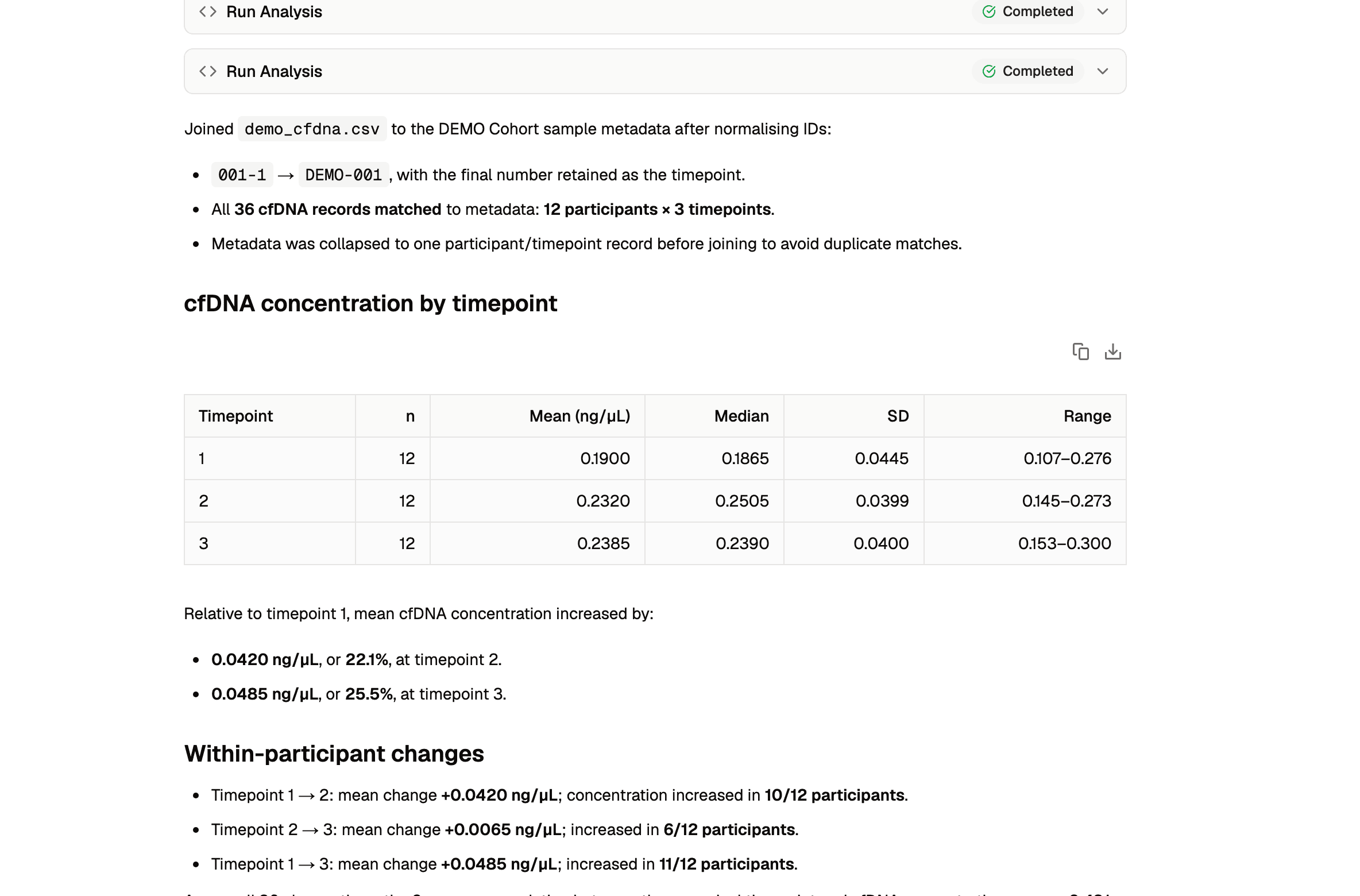
Helix workflows show the data used and the steps taken, so you can inspect and trace a result back to source.
- Each answer names the dataset it queried and the filters it applied
- It shows the steps it took, including the joins, the filtering, and the counts
- You can copy or download the table behind an answer and check it yourself
What Helix does not do.
Helix reports what is in your approved data. It does not reach outside the platform, and its analysis is a first pass for a researcher to review and not a substitute for judgement.
Interested in using Foundry120, or exploring a research collaboration?
We’d be glad to hear from research groups and institutions exploring the platform, or holding data that has outgrown spreadsheets and shared drives.
Request a platform walkthrough →